Removing the Modem and GPS from my 2024 RAV4 Hybrid
May 13th, 2026 | 14 minute readModern cars are computers on wheels - they have more sensors than you can count and are constantly phoning home with telemetry data like your location, speed, fuel levels, sudden accelerations/decelerations, video footage, driver attention data from eye monitoring systems, and hundreds of other data points. Cars have inward- and outward-facing cameras. They have microphones. They have always-on modems. It’s all enabled by default with difficult or meaningless opt-outs, and your data is monetized through brokers like LexisNexis or Verisk. This all brings a host of security and privacy issues - here are some over the years:
- In 2025 Subaru had vulnerabilities allowing anyone to remotely unlock customers’ cars, as well as access the real-time GPS location and location history of the car of the car
- Car manufacturers share your driving data with insurance companies, which then increase your premiums
- In 2023 Tesla employees internally shared camera footage of naked customers and other sensitive images
- In 2015 Charlie Miller and Chris Valasek famously took over a Jeep Cherokee with full control of the ignition, brakes, locks, steering, etc.
- Mozilla detailed how 25 car manufacturers scored abysmally on privacy and how they collect data including “sexual activity, immigration status, race, facial expressions, weight and genetic information.” They sell this data to third parties and use it to build profiles about you covering “intelligence, abilities, characteristics, preferences, and more.”
- Tesla had a vulnerability in 2017 that allowed anyone to remotely see your car’s location, manage other features, and even summon the car to themselves
- The Car That Watches You Back details how cars are now serving you ads, as well as collecting vast amounts of data about you. The Hacker News discussion about this article is what prompted this blog post
Now that we’re sufficiently motivated, what can we do about it? In this blog post, rather than relying on companies’ promises or meaningless opt-outs, we’re going to stop the data at the source by physically removing the modem (the DCM, or Data Communication Module) as well as the built-in GPS on my 2024 RAV4 Hybrid, so the car will no longer have the capability to send any telemetry data back home. Let’s dive in:
Will the car still be functional?
Yes. Depending on how different car manufacturers have wired their cars, how their software and firmware were written, etc., varying levels of functionality might be affected by removing the modem and GPS. For this car:
- Everything that relies on a data connection will no longer work. This includes things like over-the-air updates as well as Toyota cloud-based services and SOS functionality
- This is a safety tradeoff - you’re disabling automatic crash notification and emergency calling
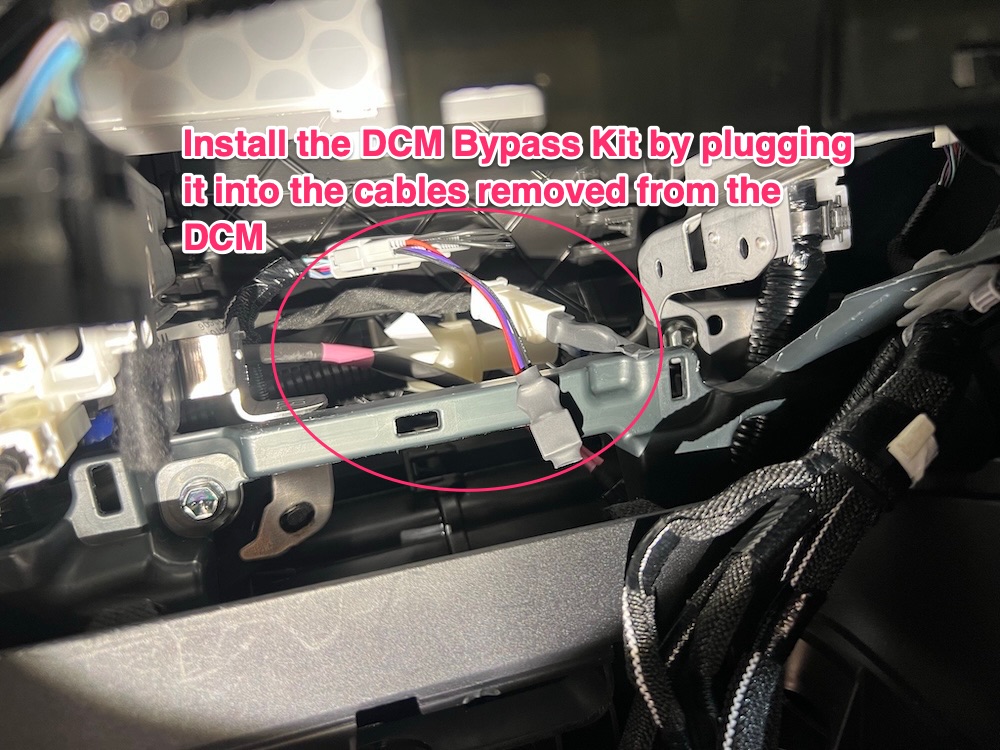
- The car’s microphone is wired through the DCM, and in the absence of any other changes removing the DCM means the in-car microphone won’t work, which is inconvenient if you plan on taking calls in the car. However we’ll install a DCM Bypass Kit (discussed more below) to restore all functionality and have a working microphone
- CarPlay has a quirk: the phone uses its own GPS but also accepts a location signal from the car’s GPS unit. After removing the DCM, the car would get confused about its location and sometimes jump my position to the middle of Nevada (I live in San Francisco), making navigation annoying. To work around this we’ll fully disconnect the car’s GPS, so it can’t send a bad location to the phone
- From the title of the blog post you might have wondered why bother removing the GPS after we’ve removed the modem - who cares if the car has built-in location when it can’t phone home with that data? This is why
- This is a well-documented bug with discussions on Apple Support threads as well as car-specific forums like rav4world. This bug affects more than just Toyotas, it’s a generic Apple bug even for people who haven’t removed their modem (but anecdotally removing my modem made the problem worse)
- Removing the DCM and GPS may void parts of your warranty - just something to be aware of. Thanks to the Magnuson–Moss Warranty Act, it cannot void the whole car warranty. It can void coverage related to the work you did (cloud services, telematics, etc.) but unrelated failures like engine problems must still be covered
So thankfully everything in the car remains 100% functional except the cloud-based services mentioned above, which I didn’t want anyway. There is also one critical caveat about Bluetooth:
No more Bluetooth
Important: Even after the modem is removed, if you connect your phone to the car via Bluetooth then the car will use your phone as an internet connection and send all the same telemetry data back to Toyota. However, if you use a wired USB connection then it does not do that (see the discussion here and elsewhere), so I exclusively use CarPlay via USB. I wish I had a way to completely disable the car’s Bluetooth functionality, but it’s deeply integrated into the head unit.
If you need USB cables for CarPlay I like these USB-A to Lightning and USB-A to USB-C cables from Anker.
Or, if you prefer the convenience of Bluetooth, you can use a Bluetooth -> wired USB adapter like this one. The adapter receives Bluetooth from your phone and presents itself to the car as a USB device, so the car treats it like a wired connection and won’t tether through your phone.
Note that I was not able to personally verify that the car uses your phone’s internet over Bluetooth - it’s based off of the rav4world discussion linked above. Offhand I would think that bluetooth tethering requires explicit opt-in but I wasn’t willing to risk it in case I’m wrong.
Now, onto the necessary tools and parts:
Tools/parts needed
For this project you’ll need:
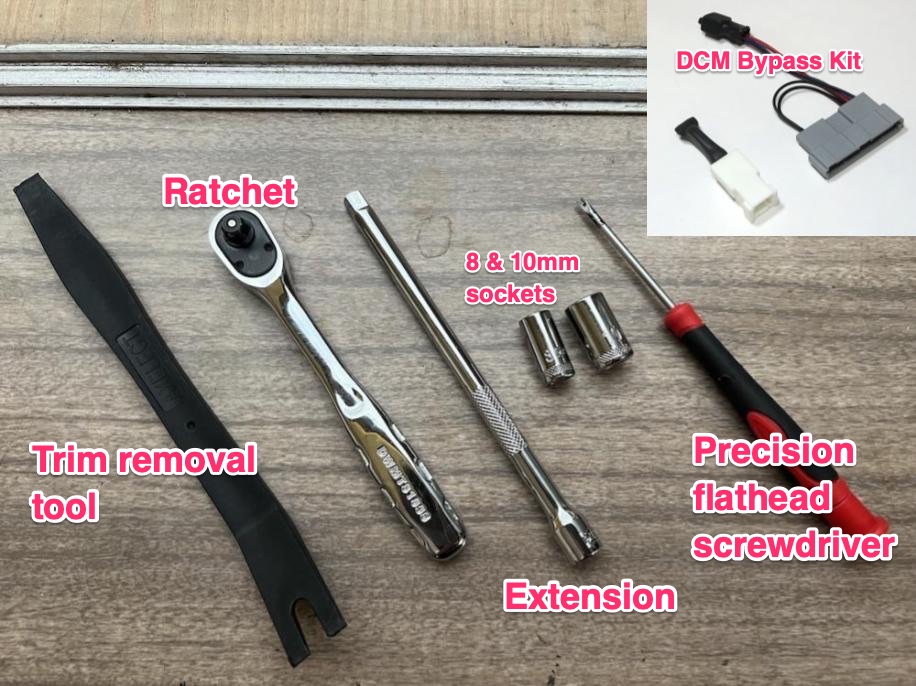
- A trim removal kit (I used this one)
- A ratchet, extension, 10mm socket, and 8mm socket
- I’ve been extremely happy with this set. However if you’re not planning on doing more handyperson type work then just borrow these 4 parts from a neighbor instead of spending the money on a whole set
- (Optional) A precision flathead screwdriver (like this one). This can help with disconnecting wire plugs
- This Telematics DCM Bypass Kit, for fixing the in-car microphone
- $90 is a bit steep for a part that probably costs less than $1 to produce, but the makers of the kit did the work of reading the (paywalled) Toyota diagnostics to produce a working product. If you’d like to build your own version you’ll need to subscribe to Toyota TIS to access the car wiring schematics. It’s unfortunate that these schematics and other repair manuals aren’t public
Overall this was a medium-difficulty project that took me a few hours to complete. Now, let’s get to work:
Removing the car modem
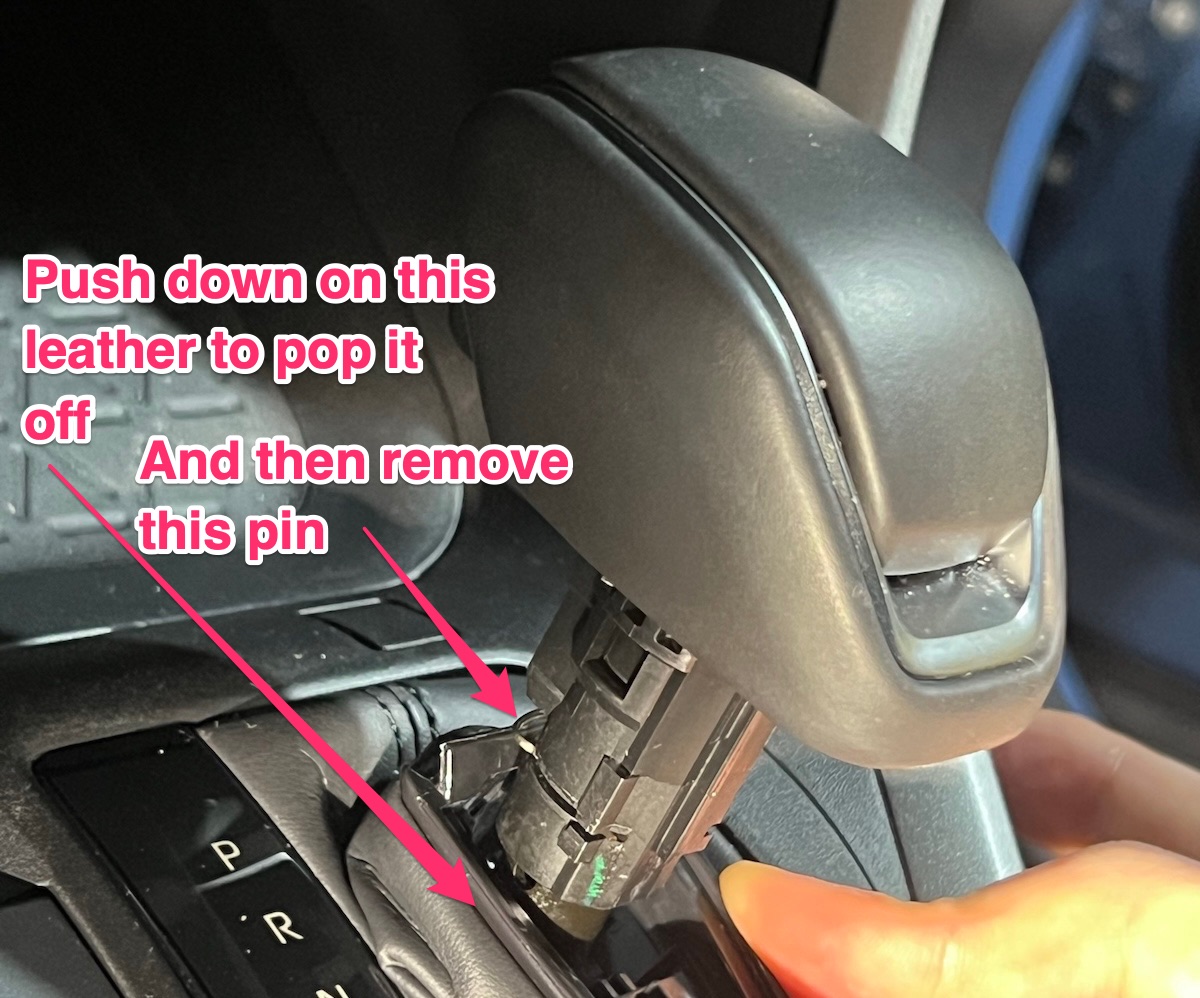
1) Push down on the leather of your shifter and remove the pin (don’t lose it!):
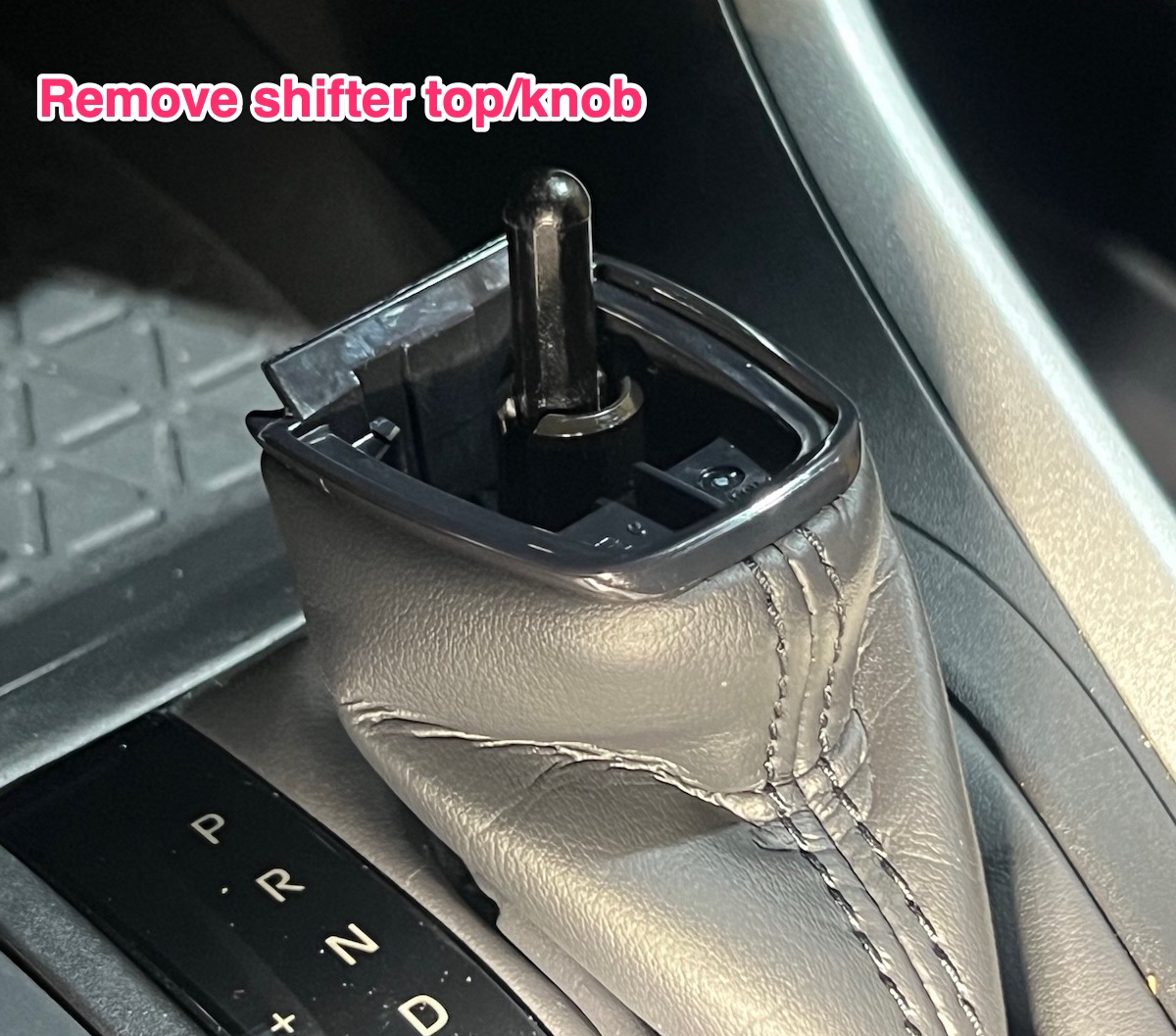
2) Remove the shifter top:
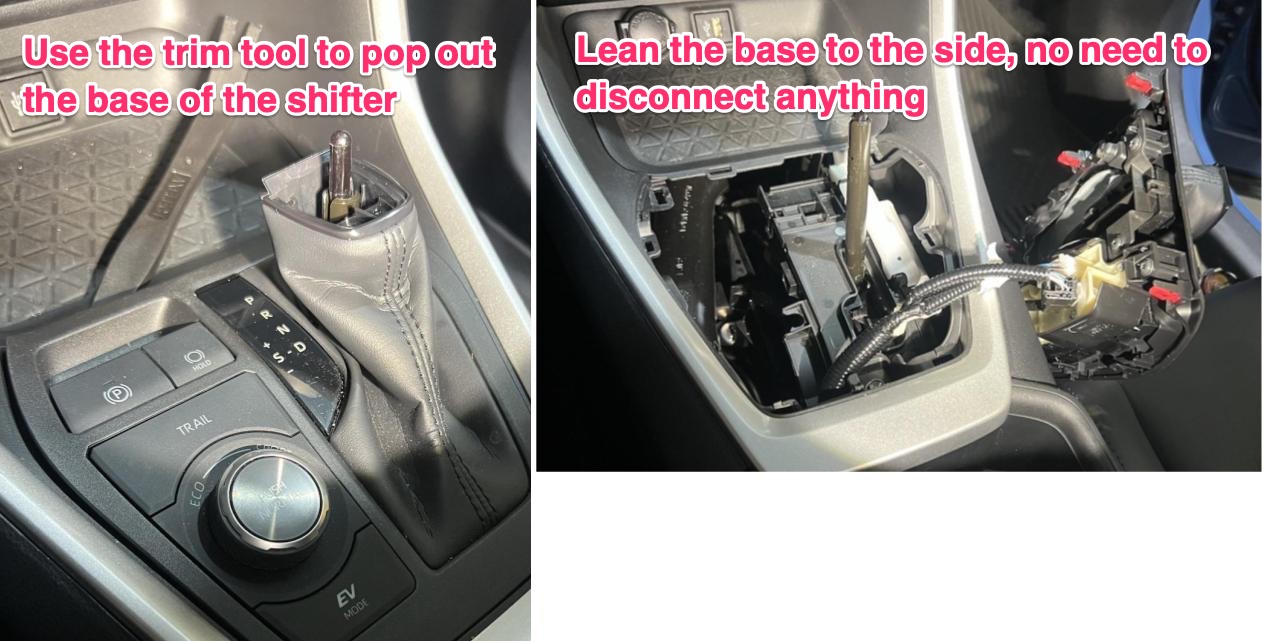
3) Use the trim tool to pop out the base of the shifter. Just lean it to the side, no need to disconnect anything:
4) Use your hands to pop out the next panel and lean it to the side:
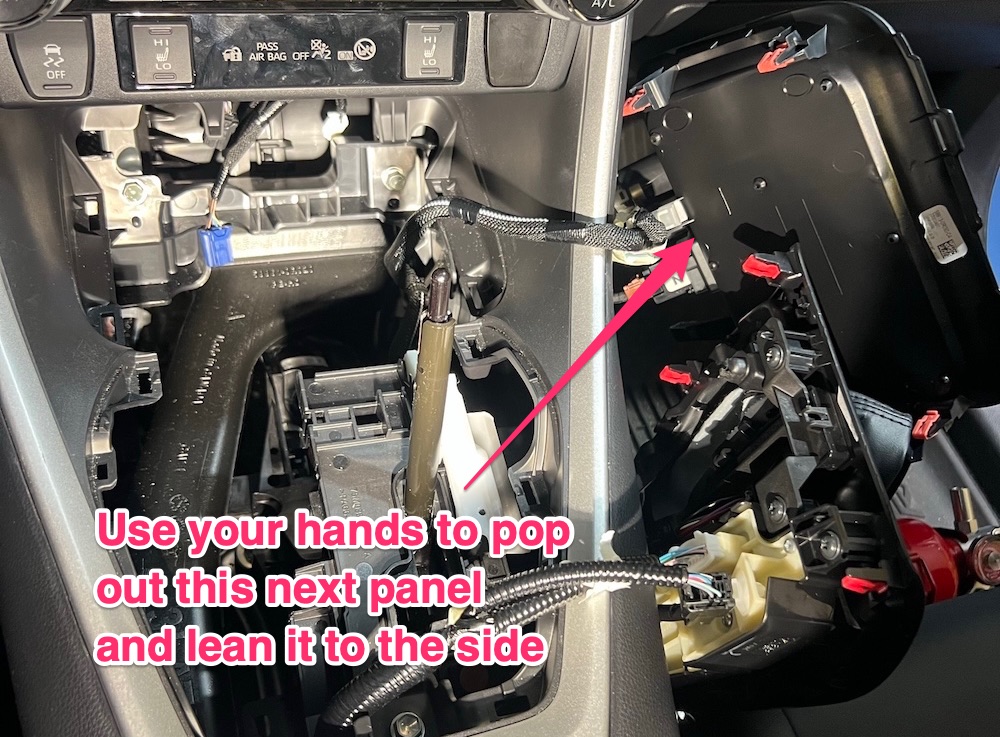
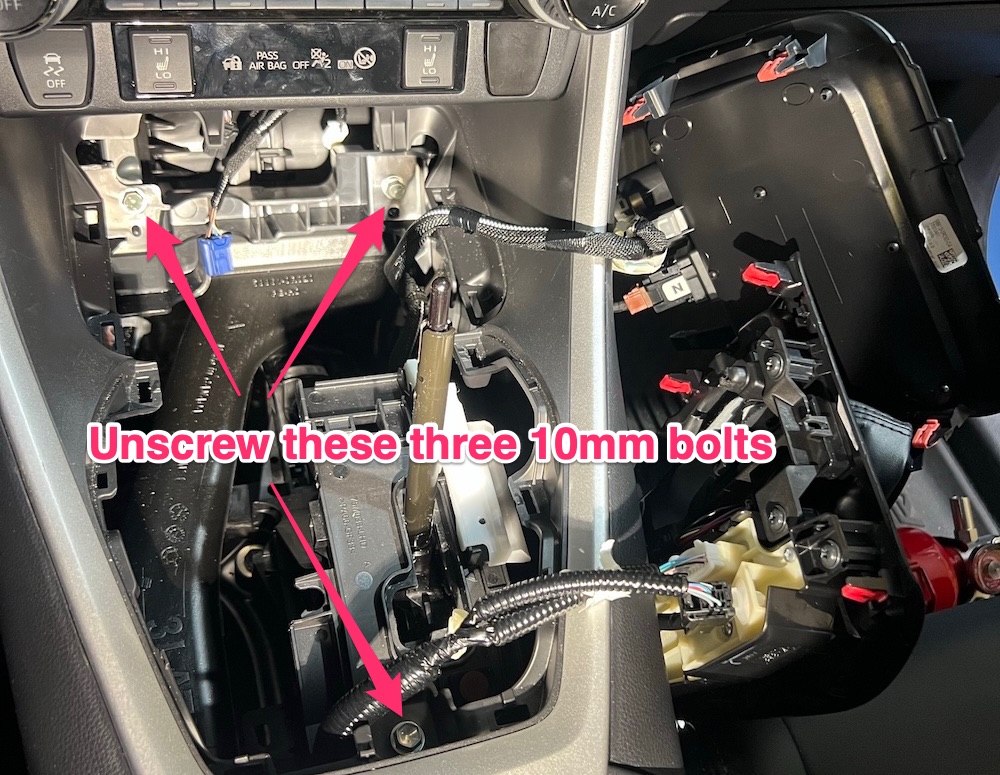
5) Remove these three 10mm bolts:
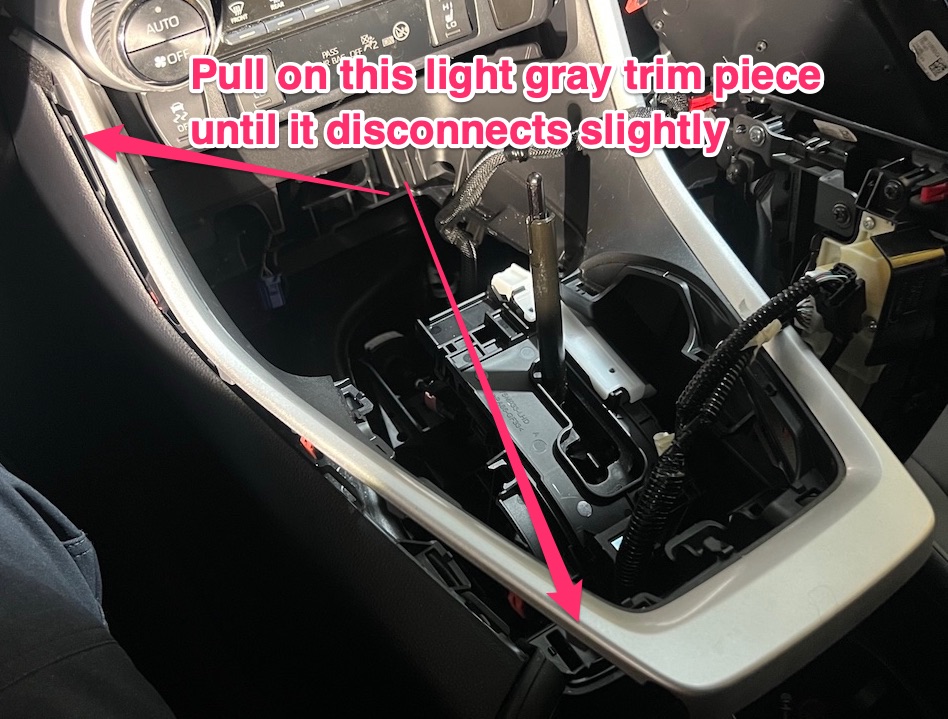
6) Pull on this light gray trim piece until it disconnects slightly:
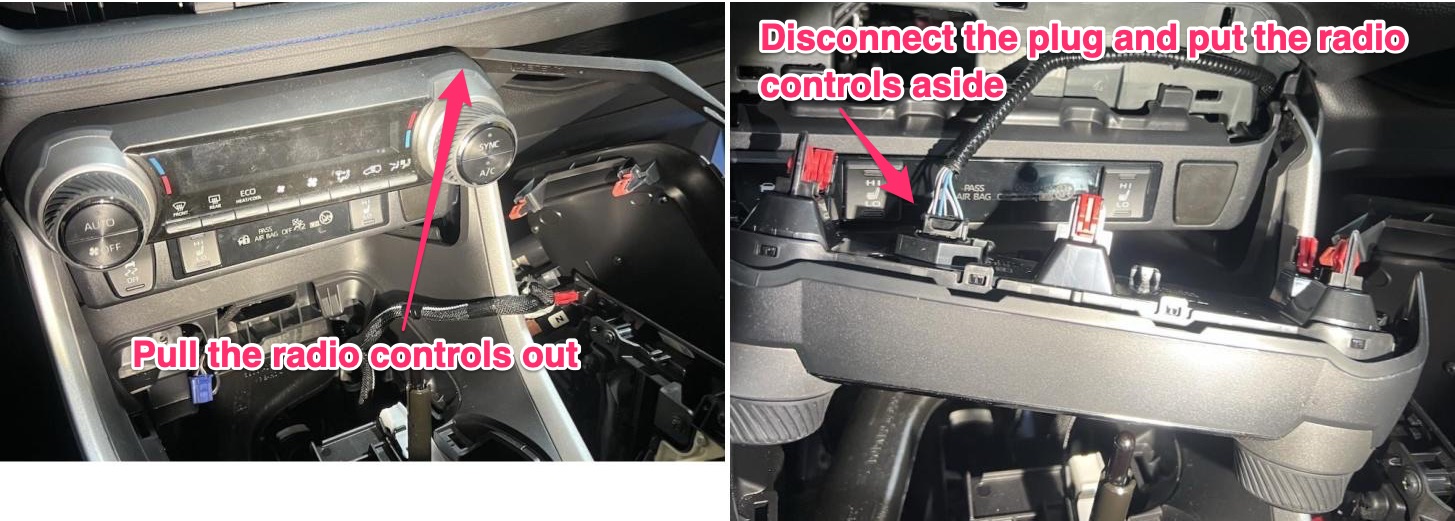
7) Pull the radio out, disconnect the plug, and put the radio aside. The radio is held on by clips only and can even be pulled out with your hands, but it requires a little force and the trim removal tool may be helpful. When disconnecting the plug it may help to use the precision screwdriver to push down on the tab to unlock it, but you can also do it with your hands:
8) Pull the next panel (the seat warming controls) out with your hands. It’s only held on by clips but may require a bit of force to remove:
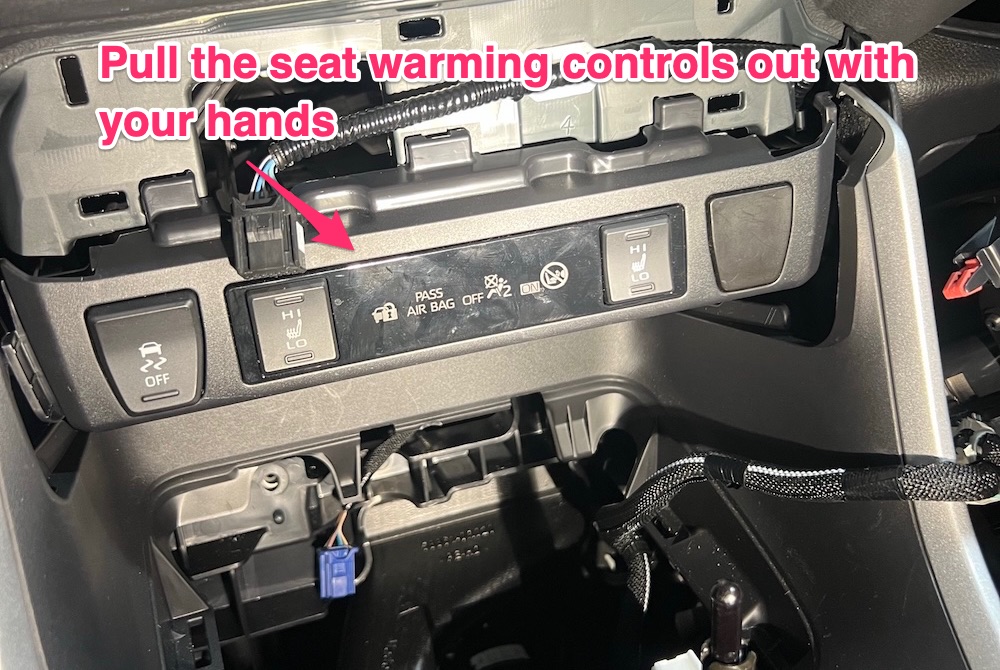
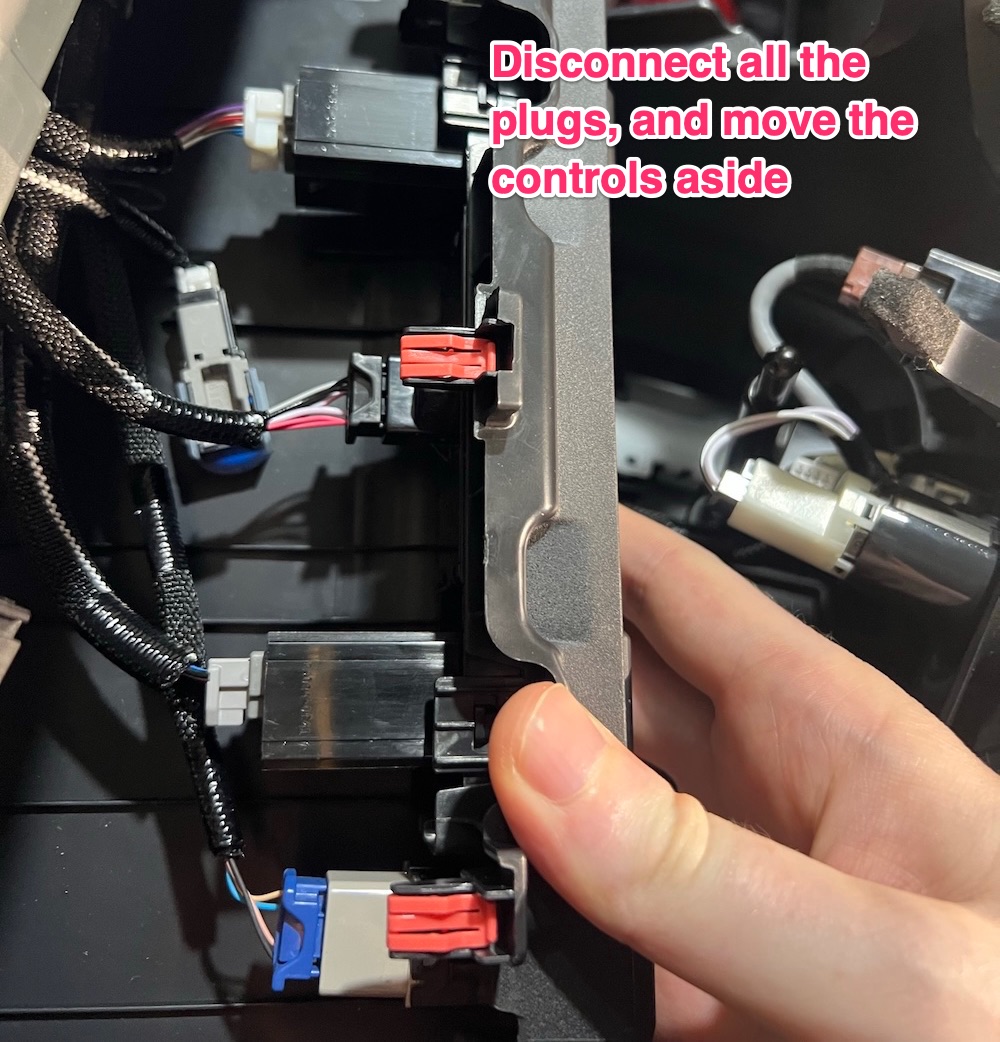
9) Take a photo of all the wiring connections on the seat warming controls so you can assemble it correctly later, unplug all the wires, and set the controls aside:
10) You now have access to the DCM:
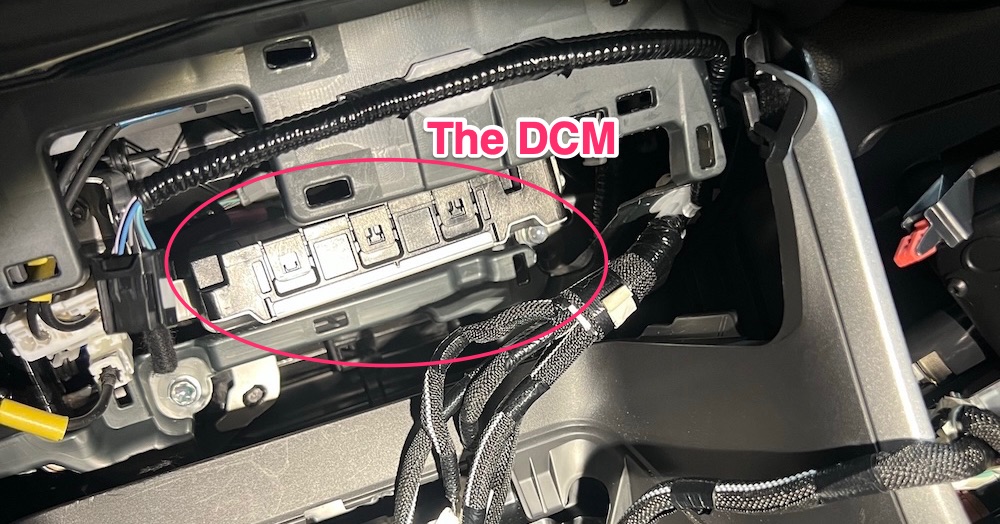
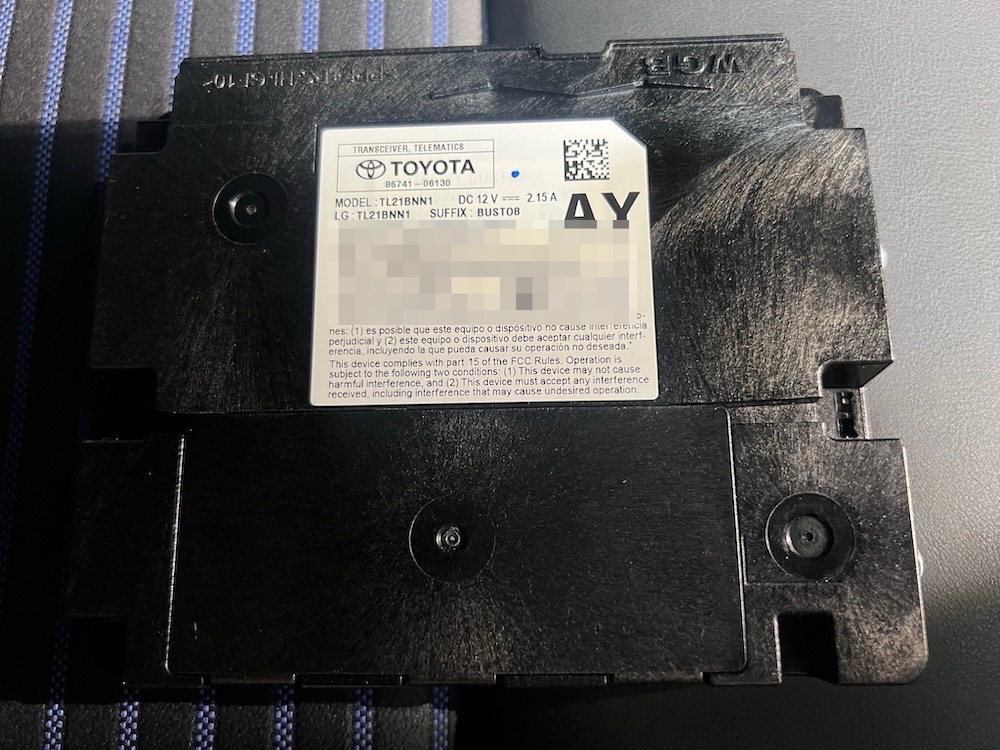
11) Removing the DCM requires a lot of maneuvering, tight spaces, and patience, but you can do it. There are two 8mm bolts on the right and one 8mm bolt on the left that need to be removed. Getting access to them may require removing some of the other harnesses or components that are in the way - just go slow and steady, take your time, and take photos of things before you move them. After those 3 bolts are removed you have a little more play to pull the unit out, and after disconnecting the wires in the back you can completely remove the DCM. Here’s mine out of the car, part number 86741-06130:
12) Now that the modem is removed we need to install the DCM Bypass Kit so the in-car microphone continues to work. It’s extremely straightforward, just plug it into the wiring harness that you removed from the DCM. The plugs will only fit on the correct wires, there’s no way to get it wrong:
13) Reassemble everything by going in reverse order. Make sure all clips, bolts, etc. are back in their original position and everything is seated correctly. This part should go much faster than disassembly.
Now you’re done with the hard part. Next we disconnect the GPS from the head unit, which is significantly easier:
Removing the GPS antenna
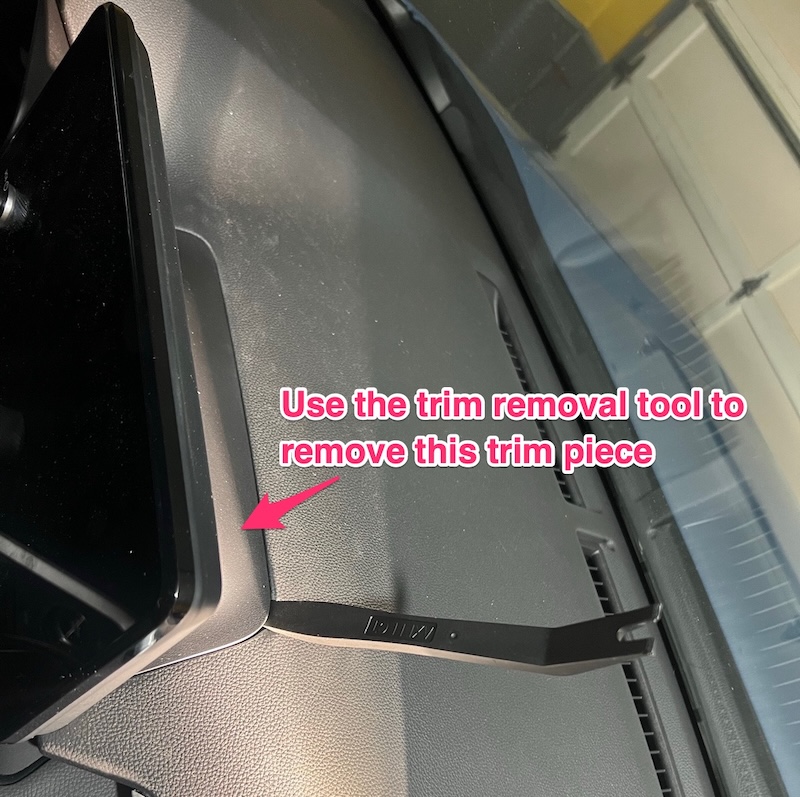
1) Use the trim tool to remove the back panel behind the infotainment screen:
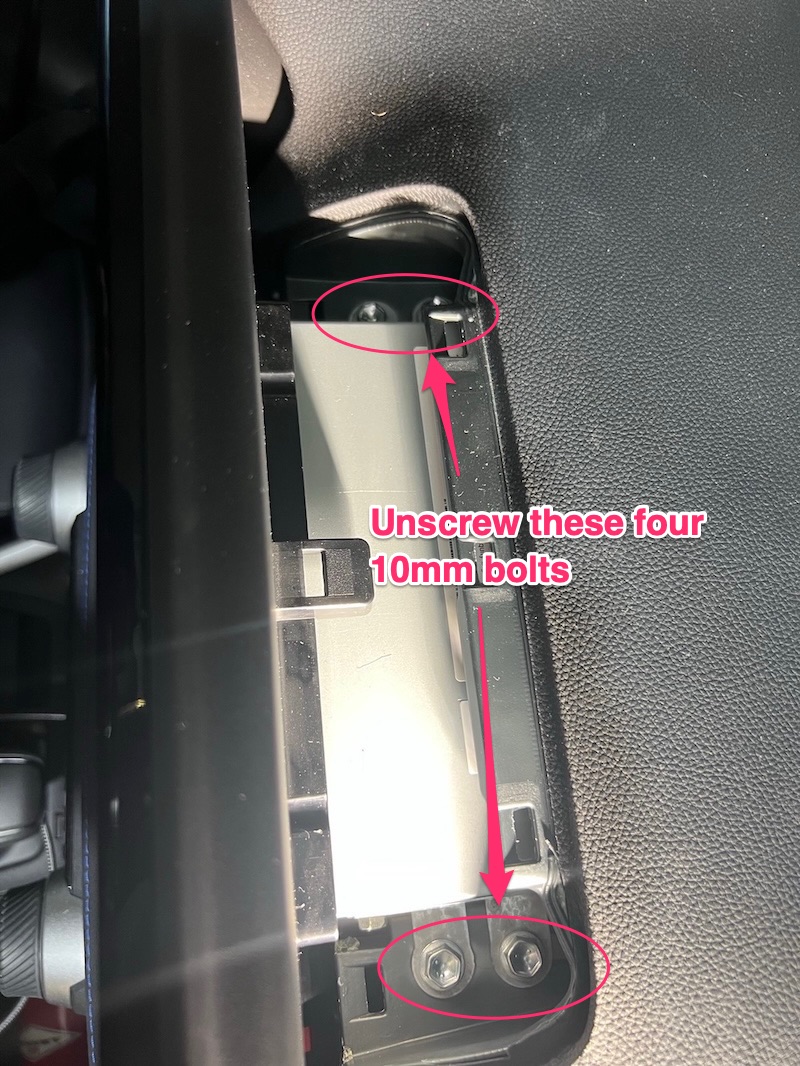
2) Unscrew these four 10mm bolts:
3) Pop the head unit out (it’s only held on by 2 clips at this point). The part number will vary but for my car it was 86140-0R710.
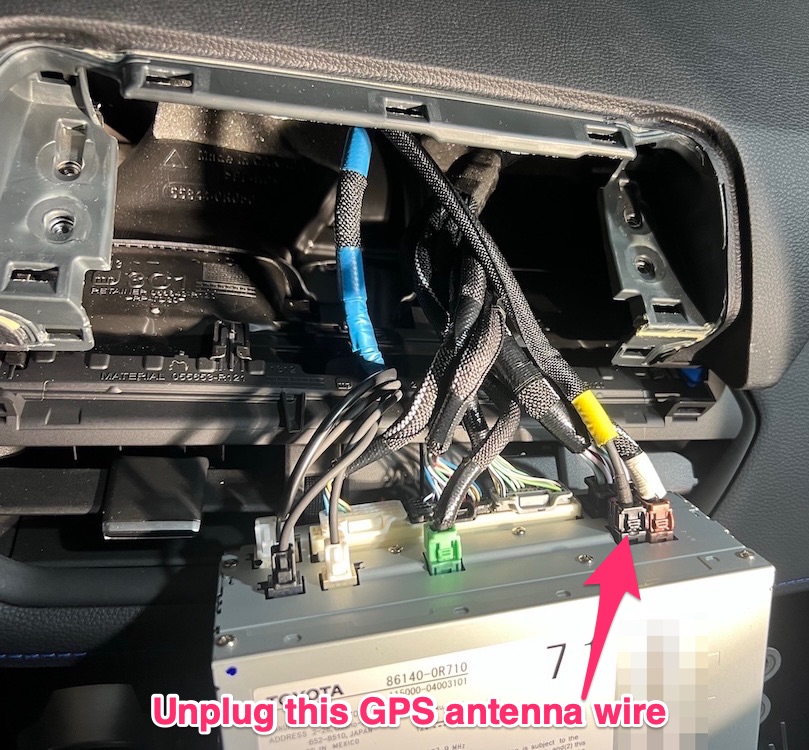
4) The GPS antenna is one of the single-wire cables (not the multi-wire plugs). I had 3 single-wire cables in my unit and the GPS wire was the black wire shown in the picture. I was able to determine this by process of elimination - unplugging one of the wires disconnected my car’s reverse camera, unplugging another one disconnected CarPlay completely, and the last one was the GPS - worked like a charm. Again, with a Toyota TIS subscription you can get access to the head unit wiring diagram and not have to make guesses about which wire is which, but process of elimination worked fine for me:
5) Reassemble everything by going in reverse order. Again, make sure that all the clips seat properly.
Confirming it worked
After you have everything reassembled, turn the car on.
1) If you unplugged the modem successfully then:
- The infotainment screen will have an icon in the upper right corner indicating no connection
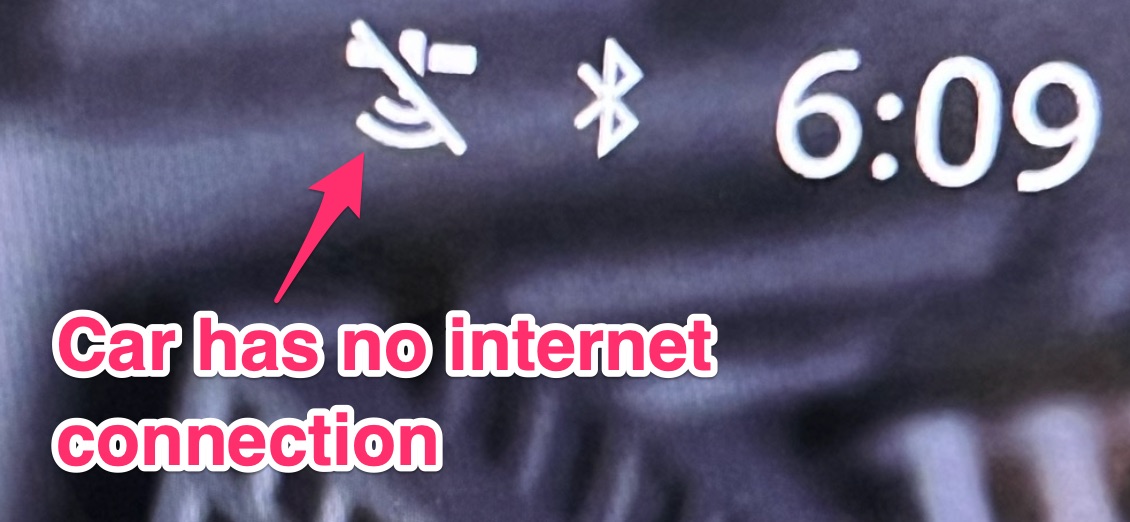
- The SOS light in the overhead console will be off:
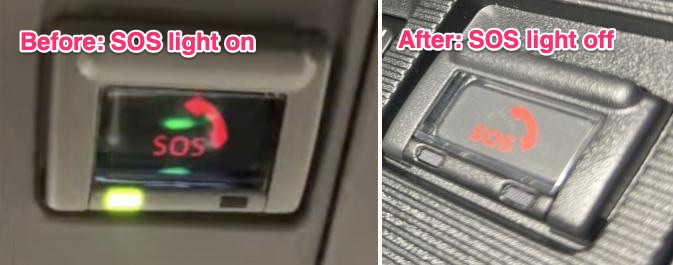
2) If the DCM Bypass Kit was installed successfully then:
- Make a phone call through CarPlay. The recipient should be able to hear you / the microphone should be working
Congratulations - your car no longer has the capability to transmit telemetry data. Of course it may still be captured to local storage and can be physically collected later, but for me that was fine.
Conclusion
Overall I’m very happy with this project. Unfortunately I think it’s only a matter of time before the modem and GPS become more deeply integrated into the car (making this blog post infeasible), or cars have more drastic failure modes when the modem/GPS is removed, or anti-right-to-repair laws get passed to further clamp down on this behavior. For now the win stands - no telemetry leaves the car. Strong Federal privacy laws would make posts like this unnecessary, that’s the world I’d rather live in.